harness-goodies
Harness Goodies
An opinionated, human-in-the-loop workflow for Claude Code. Turns a rough feature idea into shipped, reviewed, committed code — without you babysitting every step, and without letting Claude ship blind.
Skills and one adversarial review agent. Every piece explained with a worked example in the interactive handout (English · Magyar).
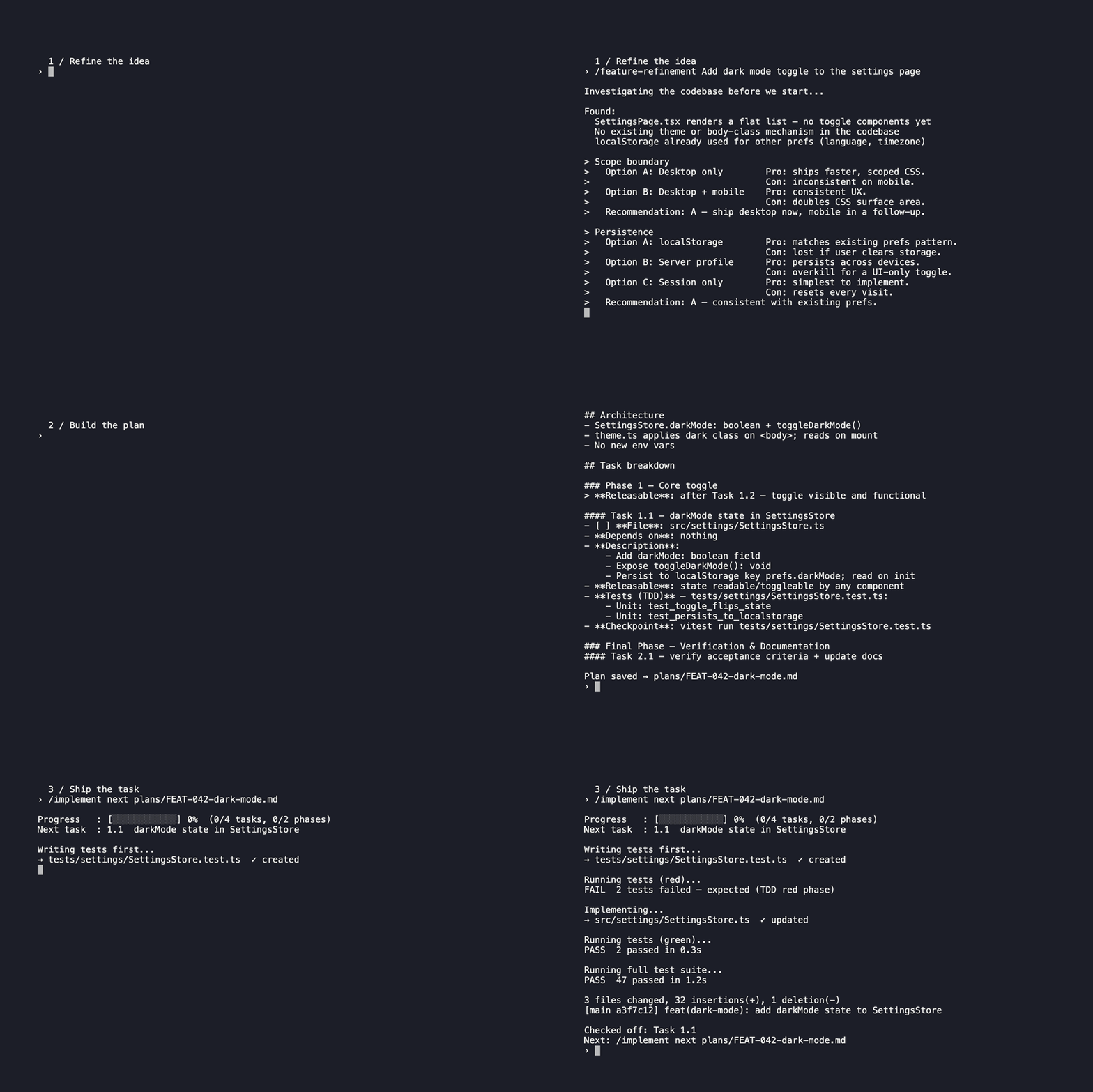
/feature-refinement→/plan-maker→/implement— idea to commit in one session./implement all <file>runs the full plan unattended.
The shape of it
flowchart LR
    A((Idea)) --> B[Brief] --> G1([You ✓]):::gate --> C[Plan] --> G2([You ✓]):::gate --> D[Code] --> G3([You ✓]):::gate --> E((Ship))
    classDef gate fill:#f59e0b,color:#000,stroke:#d97706
Three human gates, everything else automated (simplified default view; see the full handout for the 4-gate detailed pipeline). The full 9-step pipeline lives in the handout: agentic-workflow-en.html · agentic-workflow-hu.html.
What it gives you
Each entry links to its handout page with a worked example.
Ship a feature, start to finish
/feature-refinement— Turn a rough idea into a brief you can hand off. A senior product thinker walks you through the questions you’d otherwise skip./plan-maker— Stop staring at a ticket wondering where to start. Breaks the brief into the smallest tasks with tests and dependencies./implement— One command for the whole plan, four ways to call it./implement next <file>builds just the next task test-first, reviews itself, and commits — one task, one commit — then stops./implement all <file>loops through every remaining task: it spawns a subagent per task whenever the harness exposes a subagent tool — Claude Code (includingclaude -p), OpenCode, omp, Cursor — and falls back to an inline loop only where no such tool exists./implement all inline <file>forces that inline loop. Bare/implement <file>does the task if only one remains, otherwise asks next-or-all (headless defaults to next)./quick-plan— No plan yet and too busy for/plan-maker. Defines the goal, success criteria, and 4–12 steps inline — one pass, no file written./commit— Commit time. Reads the staged diff, writes a Conventional Commits message with a why-first body, and commits. Use/commit messageto draft the text without touching the repo./wrap-up— Done for the day, not sure anything slipped. Audits commit hygiene, runs tests and devil’s advocate, surfaces what’s open — mutates nothing until you say yes.
See skills/implement/SKILL.md § NEXT mode, “Step 6: Commit” for the one-task-one-commit rule.
Fix a bug
/bugfix— You have a bug and need it gone — not just patched. Drives a four-agent pipeline: failing test first, TDD fix, doc update, full review loop, commit.
Get a second opinion
/da-review— A second opinion that actually pushes back. One-pass devil’s-advocate review, no auto-fixes./iterative-review— A review that doesn’t stop at finding problems. Reviewers and fix agents loop until clean./aaa— When “looks good to me” isn’t enough. Benchmarks an idea against world-class and hands you 3–4 concrete upgrade paths./clean-code-review— Code done, want the deep read. Runs 132 checks across 7 groups (clarity, smells, SOLID, architecture, tests, safety, DDD) — on local changes, staged/unstaged/untracked, a git range, a pull/merge-request link, or specific files./options— Stuck between approaches. Produces 2–4 genuinely different paths with honest pros/cons, grounded in your actual project files, and a firm recommendation.
Powered by the devils-advocate agent — the thing actually doing the attacking. Auto-invoked by both review skills and inside /implement.
Make Claude remember
/llm-wiki— You’ve done the research, but Claude keeps forgetting it. Captures notes, sources, decisions; future chats search it first → sharper answers, fewer tokens.
Wrangle docs and skills
/documentation-standard— Docs your team will actually find again. Enforces structure across architecture notes, ADRs, manuals, and dev guides./skill-packager— Built a Claude Code skill? Make it work in Claude Desktop too. Packages your folder into an upload-ready ZIP./doc-voice— Docs that read like marketing copy or dry internal prose. Applies a problem-first, proof-led voice to READMEs, handouts, and guides — without touching structure./md-reviewer— Terms shift, cross-references rot, contradictions accumulate. Reviews Markdown for consistency, contradictions, and stale links — handles sets of 50+ files./plain-language— Need to explain a technical decision to a non-technical stakeholder. Rewrites it consequence-first, technical detail in parentheses — precise but followable without knowing the codebase.
Monitor background tasks
/status-report— Kicked off a long task and don’t know when it’ll finish. Reports status on demand or on a recurring schedule — cancel anytime withoff./session-log— One stable package for Claude Code, Codex, Cursor, OpenCode, and OMP. The host selects its identity explicitly; the package never guesses from paths, processes, or environment variables. Logging and usage stay native to each harness.
Install the universal package once. After /session-log on, restart the selected harness when it reports on — restart required; Codex instead reports on — trust review/restart required, because its new hooks.json commands require review before restart.
One script bundle handles the progress plumbing — scripts-plan prints the next-task progress header — /implement reads it once in NEXT mode, and on every iteration in ALL mode. The session-log skill archives the prompt and response text exposed by each harness as per-project Markdown; the universal package owns activation and migration for all five harnesses. See the session-log handout for details.
Install · Update
Claude Code plugin marketplace
claude plugin marketplace add user538295/harness-goodies
claude plugin install claude-goodies
The marketplace plugin bundles the Claude skill, runtime, and native hooks. While the plugin is enabled at user scope (enabledPlugins in ~/.claude/settings.json sets claude-goodies@<marketplace> to true, which claude plugin install writes by default), its hooks/hooks.json owns the session-log hooks: /session-log on, off, repair, and (while logging is on) status remove every session-log hook from ~/.claude/settings.json, and a new session does the same silently, which clears dead paths that older releases wrote into the versioned plugin cache. A session repeats that cleanup only when settings.json, the session-log package (its location or VERSION), the plugin version that last started a session, or the presence of a hook script that settings.json registers changed since that session-log copy’s last successful cleanup; /session-log repair runs it on demand and reports what it changed. Once the plugin’s hooks have started a session, a standalone session-log copy under ~/.claude/skills defers to them and registers no settings.json hooks of its own, unless Claude Code has orphaned that plugin version after an update or uninstall. With the plugin enabled only at project, local, or managed scope, the plugin removes only dead session-log registrations (those whose script no longer exists or lies in the versioned plugin cache) and the standalone copy keeps its settings.json hooks, so that project may log twice. With the plugin enabled at user scope but disabled at project or local scope, that project does not log, because the standalone copy still defers to the plugin. After uninstalling or disabling the plugin, run /session-log on once to register the standalone copy’s hooks again. Restart Claude Code (or start a new session) for plugin changes to load. To update later:
claude plugin update claude-goodies@user538295
omp plugin marketplace
omp plugin marketplace add user538295/harness-goodies
omp plugin install omp-goodies@user538295
Inside omp the same steps are /marketplace add user538295/harness-goodies and /marketplace install omp-goodies@user538295. omp reads its own catalog (.omp-plugin/marketplace.json) and installs omp-goodies: every skill (including /skill:da-review and /skill:iterative-review) and the devils-advocate agent with omp tool names. Run /reload-plugins or start a new session to load them. To update later:
omp plugin marketplace update user538295
omp plugin upgrade omp-goodies@user538295
Session logging is opt-in: /skill:session-log on seeds the stable package under ~/.omp/agent and links its extension; restart omp once, after which /session-log status|on|off|usage|repair works directly.
Each entrypoint passes its native harness identity explicitly; it never infers a harness from directories or environment variables. off never installs an absent adapter.
Cursor plugin
Cursor reads its own manifests (.cursor-plugin/plugin.json and .cursor-plugin/marketplace.json) and installs cursor-goodies: every skill and the devils-advocate agent. The plugin ships no hooks; session logging stays opt-in through /session-log on. Install it through one of two marketplace routes.
Cursor Marketplace. Once Cursor has reviewed and listed the plugin, open Customize in the sidebar, search for cursor-goodies, select Install, and choose a project or user scope. Cursor reviews every update before publishing it.
Team marketplace (Teams and Enterprise plans; on Enterprise only admins can add one):
- Open Dashboard → Plugins & MCPs.
- In Team Marketplaces, click Add Marketplace, choose Import from Repo, and paste
https://github.com/user538295/harness-goodies. - Add
cursor-goodieswith Add to Marketplace. - Under Marketplace Settings, set Marketplace Access and optionally Enable Auto Refresh (needs the Cursor GitHub App on the repository), then save.
- Each developer installs
cursor-goodiesfrom Customize, unless an admin set it to Default On or Required.
To update later, Auto Refresh re-indexes the marketplace after each push; otherwise click Refresh on the marketplace.
Codex plugin
codex plugin marketplace add user538295/harness-goodies
codex plugin add codex-goodies@user538295
Codex reads its own manifests (.agents/plugins/marketplace.json and .codex-plugin/plugin.json) and installs codex-goodies: every skill, namespaced as codex-goodies:<skill>. Codex plugins carry no agents, so devils-advocate is not included; da-review and iterative-review fall back to generic subagents that read the persona from the plugin’s agents/devils-advocate.md. The plugin ships no hooks; session logging stays opt-in through the session-log skill’s on command. Start a new session to load it. To update later:
codex plugin marketplace upgrade user538295
Installed claude-goodies@user538295 in Codex before this plugin existed? Switch with codex plugin remove claude-goodies@user538295 && codex plugin add codex-goodies@user538295; that install also registered the Claude Code session-log hooks, which the switch removes.
OpenCode plugin
opencode plugin add github:user538295/harness-goodies
Requires OpenCode V2. OpenCode installs the opencode-goodies package (package.json plus .opencode-plugin/index.js) into its package cache, adds it to ~/.config/opencode/opencode.json, and loads it without a restart. The plugin registers every skill and the devils-advocate subagent. To update later:
opencode plugin update
Skills and agents with the same names under ~/.config/opencode/skills and ~/.config/opencode/agents take precedence over the plugin’s copies; remove those copies to use the plugin’s versions. Session logging stays opt-in through /session-log on.
Universal session-log package
From a checkout of this repository:
bash install-universal-session-log.sh
The wrapper seeds or updates the complete stable package without enabling logging under the five default harness roots: Claude Code ~/.claude, Codex ~/.codex, Cursor ~/.cursor, OpenCode ~/.config/opencode, and OMP ~/.omp/agent. It also installs OpenCode’s command entrypoint.
To install or update one harness from the checkout, use its explicit identity:
bash skills/session-log/install.sh --install --harness claude
bash skills/session-log/install.sh --install --harness codex
bash skills/session-log/install.sh --install --harness cursor
bash skills/session-log/install.sh --install --harness opencode
bash skills/session-log/install.sh --install --harness omp
A normal command also bootstraps or updates that harness’s stable package before dispatching the command:
bash skills/session-log/install.sh --harness opencode --arguments "on"
The supported identities are exactly claude, codex, cursor, opencode, and omp. The universal SKILL.md requires the current host/model to choose one explicitly; identity is never inferred from directories, processes, or environment variables.
Only default roots are supported. OpenCode also reads native data from ~/.local/share/opencode; relocated config or data roots fail explicitly. Logging remains off until enabled separately in each harness. When logging is already enabled, status and usage repair a missing or outdated adapter after the package bootstrap.
OpenCode and OMP keep per-process runtime records alongside the shared runtime pointer. The adapters bound their in-memory session history; after a process restart, the on-disk logs remain the source of recorded prompts and responses.
Why this repo has opinions
Unconstrained AI coding produces verbose, coupled code that accumulates fast and is hard to reverse. Constraints aren’t slow — they’re the thing that makes the output trustworthy enough to ship.
The repo is developed under the guidelines in its own AGENTS.md, which Claude Code, Codex, OpenCode, and omp load at session start. The plugins don’t install it — copy it into your own AGENTS.md or ~/.claude/CLAUDE.md if you want the same rules. It encodes three principles:
- Think before coding. Verify and cite every claim, state assumptions, surface tradeoffs, push back when warranted.
- Simplicity first. Minimum code that solves the problem; nothing speculative.
- Surgical changes. Touch only what the task requires, and fix any concrete defect you find along the way.
All three are adapted from Andrej Karpathy’s guidelines.
And enforces: tests before code (85%+ coverage), warning-free codebase at all times. skills/implement/SKILL.md adds the execution-level rule: one commit per plan task, no batching multiple tasks into a single commit.
If that’s not your speed, this repo isn’t for you. If it is — install in 30 seconds.
Requirements
- Universal session-log: Claude Code, Codex, Cursor, OpenCode, or OMP.
- macOS or Linux — or Windows via WSL.
- Native Windows is partial: the Claude Code plugin’s session-log hooks run under Git Bash (install Git for Windows), exit 0 silently when their script is missing, and need no jq while logging is off.
/session-log on,off,repair, the session-startsettings.jsoncleanup, and the package install need WSL. Whilesettings.jsonholds session-log hooks, each session start on native Windows attempts that cleanup, which fails silently and is retried at the next session start (a small startup delay), because only a successful cleanup is recorded. Use WSL to log sessions on Windows. - bash, Python 3, jq, standard POSIX utilities, and
shasumorsha256sum. - sqlite3 for OpenCode native usage reports.
- Bun for OMP native usage reports.
No MCP servers are required.
Full reference, with worked examples for every skill, agent, and script — open the handout: English · Magyar.